Buying Guide
TV Remote for Seniors: Big Buttons, Few Buttons
Affiliate disclosure: We may earn a commission if you buy through links on this page. It never changes our rankings. How we earn
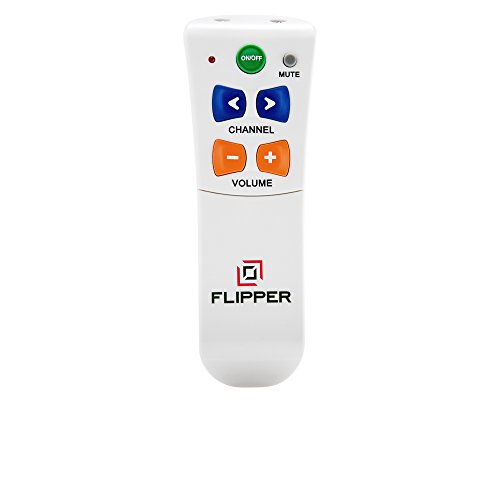
In our view, fewer buttons matters more than bigger buttons. Flipper lists six buttons on its face: power, mute, volume and channel (flipperremote.com, November 2026). With no input button in easy reach, a remote like that can help avoid the wrong-input problem.
One catch decides everything. These remotes run the TV and a cable or antenna box. Most cannot run a streaming box such as a Roku.
We are a research desk. We read each maker’s own page and the Amazon listing; we did not test these remotes by hand. Facts are as of November 2026.
Which remote for which problem
Start with what goes wrong today. The fix follows from that.
Too many buttons
Pick a six-button remote such as the Flipper or EasyMote. It keeps just the basics.
Keeps landing on the wrong input
A six-button remote with no input button on its face, such as the Flipper, can help avoid an accidental switch to the wrong source.
Keeps losing the remote
A bright remote in one fixed spot helps. See the caddy note below. A spare simple remote is cheap insurance.
Tremor or stiff fingers
Large, well-spaced buttons forgive a shaky press. EasyMote adds backlighting for evening viewing.
Small print is the only problem
A big-button universal remote such as the GE 2-Device keeps the full set of functions behind larger labels.
The three remotes side by side
From each maker’s page, manual or Amazon listing, as of November 2026. Where they say nothing, we say so.
| Remote | Controls | Learns old remote | Cable / satellite box | Streaming boxes | Battery | Buttons |
|---|---|---|---|---|---|---|
| Flipper Big Button Remote | TV + one cable, satellite or antenna box | Yes, per the Amazon listing. Flipper's own page does not cover it | Yes | No. Flipper says it does not support Roku, Google TV, Apple TV or Fire TV | 2 AAA (not included) | 6 large buttons on the face |
| EasyMote (DT-R08B) | IR TVs and set-top boxes | Yes, per the Amazon listing | Yes. Its Amazon listing says to turn on IR in Xfinity and Dish boxes | Not mentioned by the maker; treat as no | Not stated on the maker page | 6 large backlit buttons |
| GE Big Button Universal Remote, 2-Device (33701) | 2 devices (per the Amazon listing) | Not stated on the listing we could read | Listed as a universal remote; check your box brand on the listing | Listing names Roku and Apple TV; IR models only | Not confirmed: check the listing | Big-button full keypad |
We also looked at the Tek Pal and GE’s 4- and 6-device big-button models. We could not confirm a current Amazon listing for them, so they are not listed here.
The picks, and who each one suits
Too many buttons
Flipper Big Button Remote
The Flipper shows six buttons on its face: power, mute, volume up and down, channel up and down. Channel numbers and four extra keys hide under a sliding cover. Flipper says one remote runs the TV and a cable, satellite or antenna box.
For: a parent who presses the wrong thing, or watches cable or antenna TV and only needs the basics.
Not for: anyone who watches through a streaming box such as a Roku. On a smart TV, Flipper says it runs the basic functions only.
shopping_cartCheck price on Amazon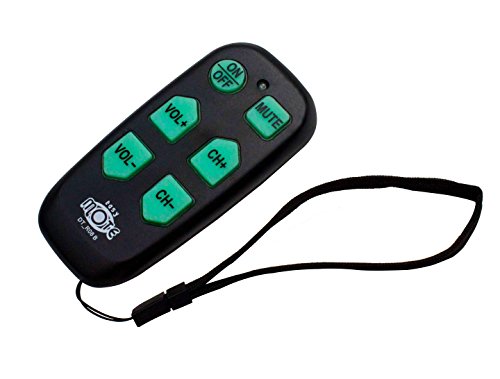
Too many buttons, dim room
EasyMote (DT-R08B)
The EasyMote listing describes six large backlit buttons for basic TV control. The Amazon listing says it can learn commands from the old TV or cable remote. We could not find a maker page that explains locking the setup.
For: an evening viewer who needs to see the buttons in low light, and a family helper willing to teach it the old remote once.
Not for: streaming-box households, or a setup with no working original remote to learn from.
shopping_cartCheck price on Amazon
Large print, two devices
GE Big Button Universal Remote, 2-Device (33701)
This is a large-print universal remote rather than a stripped-down one. The Amazon listing says it runs two devices and names Samsung, Vizio, LG and Sony TVs plus Roku and Apple TV among them. We see it as the fuller-keypad choice, with more buttons than the Flipper or EasyMote.
For: a reader who can manage a normal remote but needs larger print, or a home with a TV plus one streaming box that takes infrared.
Not for: someone confused by too many buttons. Bigger print does not mean fewer choices.
shopping_cartCheck price on AmazonTwo options before you buy anything
Try the TV’s own voice remote
Many newer TVs and streaming boxes come with a remote that has a microphone button. Holding that button and saying a channel name can be easier than any keypad. It suits a clear speaker with good hearing. It does not suit someone who forgets which button to hold.
Give the remote one home
A remote caddy fixed to the chair arm or side table cuts down on lost-remote days. Put only the simple remote in it. Put the original remote in a drawer, or in a box with a lid, so it is not picked up by mistake.
What the family helper sets up once
Plan on one visit. Bring fresh batteries.
- Find out how they watch. Cable or satellite box, antenna, or a streaming box like Roku? If it is a streaming box, stop here and read “What it cannot do” below.
- With the original remote, set the TV to the input they watch on. Write that input name on a note by the TV.
- Pair the new remote using the maker’s instructions. The EasyMote listing says it can learn buttons from the old remote.
- Test power, volume and channel from their chair, not from beside the TV.
- Lock the setup if the maker’s instructions say the remote allows it.
- Set favorite channels if the remote has them, so one button reaches the news.
- Put the old remote away. Show the new one twice, then let them try.
The EasyMote Amazon listing says: “Make sure to activate IR in Xfinity and Dish!” (checked November 6, 2026). So those boxes may ignore an infrared remote until IR is on in the box settings. If any new remote is ignored by the box, check that setting first.
What a simple remote cannot do
- Streaming apps. No Netflix menus, no app switching. Flipper says it does not support Roku, Google TV, Apple TV or Fire TV.
- Smart TV menus. On a smart TV, Flipper says it handles basic functions only.
- TVs that do not take infrared. Simple remotes like these usually send infrared light. A TV or stick that only listens over Bluetooth or Wi-Fi will not respond.
- Fixing a broken setup. If the TV is on the wrong input, a simple remote may have no button to fix it. Keep the original remote somewhere the helper can find it.
A note for families living with dementia
Fewer buttons may help more than bigger buttons. Fewer keys can mean fewer ways to land on a blank screen. Try the six-button style, lock it if the maker allows and keep the old remote out of sight.
The same idea applies to the phone. Our phones for elderly with dementia guide covers phones with fewer choices and locked settings.
Frequently Asked Questions
What is the best TV remote for seniors?
It depends on the problem. If the trouble is pressing the wrong button, a remote with fewer buttons may suit better, such as the Flipper or EasyMote (six buttons each).
If the trouble is reading small print, a big-button universal remote like the GE 2-Device keeps a full keypad with larger labels. Either way, check whether the TV is watched through cable, antenna or a streaming box before you buy.
Do big button remotes work with Roku or Fire TV?
Mostly no. Flipper says plainly that it does not support Roku, Google TV, Apple TV or Amazon Fire TV. EasyMote's maker does not mention streaming devices.
The GE 2-Device listing names Roku and Apple TV. It is an infrared remote, so it can only run a box that accepts infrared. A streaming stick that listens only over Bluetooth or Wi-Fi will not respond.
What is a good TV remote for someone with dementia?
Fewer buttons may help more than bigger buttons. Flipper lists six buttons on its face: power, mute, volume and channel (flipperremote.com, November 2026). With no input or menu button in easy reach, a remote like that can help avoid an accidental switch to a blank screen.
If the maker's instructions offer a way to lock the setup, use it. Keep the old remote out of reach so it cannot undo the work.
Can a simple remote change the TV input?
Often it cannot, and that can be useful. Flipper's face has power, mute, volume and channel only, per flipperremote.com in November 2026. Leaving input switching off the face can help avoid the TV landing on a blank input by accident.
If the TV needs a different input to watch cable, set it once with the original remote, then hand over the simple one.
Do these remotes need a monthly fee or Wi-Fi?
The product listings we checked showed no monthly fee, app or account on any of the three, as of November 2026. Flipper says its remote takes 2 AAA batteries, not included.
For EasyMote and the GE 2-Device, we could not confirm the battery type from the maker or the listing. Check the listing before you buy.
Sources
- EasyMote Amazon listing, ASIN B01LY0FCQO (amazon.com/dp/B01LY0FCQO), checked November 6, 2026: the IR note for Xfinity and Dish boxes.
You now know which remote fits which problem, and that streaming boxes are the dividing line. Next question: what else in the house could be simpler? Our best tech for seniors guide covers tablets, photo frames and easy video calling.