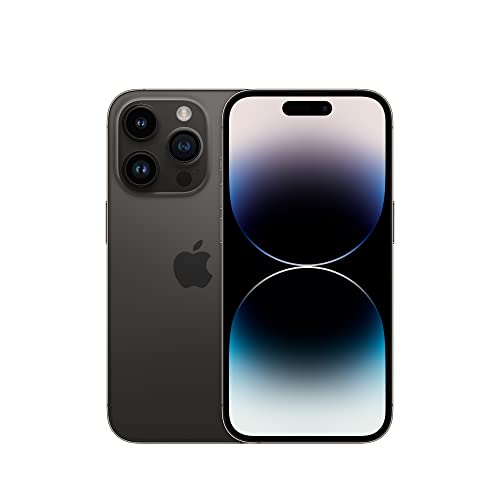
iPhone 14 Pro (Renewed)
Affiliate disclosure: We may earn a commission if you buy through links on this page. It never changes our rankings. How we earn
The most capable safety toolkit of any phone here: best for a tech-comfortable senior or one already in the Apple ecosystem, or where display clarity matters most. We point to a certified-renewed iPhone 14 Pro, the affordable way most seniors buy into iOS.
auto_awesomeWhat stands out
Drawn from published specs and aggregated owner reviews, not first-hand lab testing.
- check_circleEmergency SOS via satelliteCan reach emergency services with no cell signal: the only phone in this comparison with this capability, useful for rural areas and travel.
- check_circleFall detection (with Apple Watch)Paired with an Apple Watch, the system can detect a hard fall and contact emergency services if the user is unresponsive.
- check_circleDeep accessibility settingsText up to roughly 310% of default, high-contrast modes, VoiceOver, and AssistiveTouch make iOS highly adaptable once configured.
- check_circleFaceTime with familyIf relatives also use iPhones, FaceTime and shared albums make staying in touch simple and high quality.
- check_circleStrong display clarityThe Super Retina XDR screen is among the sharpest here, which helps for reading.
Prices change often; confirm the current price before buying. If you buy through this link we may earn a commission, which does not change how we rate or describe products.
Who the iPhone 14 Pro (Renewed) is NOT for
- do_not_disturb_onA first-time smartphone user with no family support: full iOS is the most setup-heavy option in this guide.
- do_not_disturb_onBudget buyers; even renewed models cost more than the Jitterbug or Consumer Cellular phones.
- do_not_disturb_onA senior who wants a list-based menu or physical keypad rather than a full app interface.
Setup & caregiver burden
For a non-technical user, this is the heaviest setup of the group. Creating an Apple ID, signing into iCloud, enabling large text and simplified layout, and setting up Emergency SOS and Medical ID all take time and usually family help. The payoff is that, once configured, iOS is genuinely adaptable, but the gap between out-of-box and senior-ready is wide.
Plan-dependent vs device features
The safety and accessibility features are in the device and the Apple ecosystem, not a carrier plan: Emergency SOS via satellite, accessibility settings, and Medical ID are built in, while fall detection requires an Apple Watch. There is no required senior plan (the iPhone works on any major carrier). Plan choice is about price, not features.
Cost over time
A certified-renewed iPhone 14 Pro costs far less than a new flagship, which is exactly how many seniors buy into iOS without paying full price. Add any major-carrier plan (Consumer Cellular from ~$20/month is popular). The device cost is the real hurdle. Renewed pricing moves constantly and varies by seller and condition grade. Verify the current price before buying.
The real tradeoff
You trade price and setup effort for the strongest safety toolkit and the smoothest experience for anyone already using Apple devices. For a tech-comfortable senior or an Apple family, that trade is easy. For a first-time, budget-conscious buyer, a purpose-built senior phone is the more sensible starting point.
Editorial assessment
The iPhone 14 Pro is the most capable phone in this comparison. Capability is not the same as the right fit. The recommendation hinges almost entirely on the user's comfort with technology and existing ecosystem.
Because a new Pro is expensive, we point to a certified-renewed unit, the sensible way for a senior to get iOS and its safety toolkit without paying flagship prices.
For a senior already using a Mac, iPad, or Apple Watch, the iPhone is the obvious choice. FaceTime, iMessage, shared albums, and Find My create a connected experience Android cannot quite match. Caregivers on iPhones benefit too.
Its safety toolkit is the strongest here: Emergency SOS via satellite works with no cell coverage. Fall detection via Apple Watch can summon help automatically.
For a first-time smartphone user with no technical background, the full iOS interface can be overwhelming without meaningful setup and ongoing family support.
Based on Apple's published specs and aggregated owner reviews, the hardware is excellent. The question is whether the person and their support network match what it asks of them. Renewed pricing varies by seller and condition, so verify the current price before buying.
The bottom line
The renewed iPhone 14 Pro is the best fit for a tech-comfortable senior, or one with family who can help set it up, especially within an Apple household.
Its accessibility and safety features (particularly Emergency SOS via satellite, which needs a clear view of the sky) are the strongest in this comparison. Buying renewed keeps the price far below a new flagship. For a first-time user, the Jitterbug Smart4 is the friendlier starting point.
How we rate it
Our editorial rating
BestPhonesForSeniors score · by Marian Cole, Senior Editor · updated May 2026
This is our own editorial assessment, not a customer or Amazon rating. Each criterion is scored 1–5 from this phone's documented features. The overall is the weighted average shown below. Weights: ease of use 30%, safety 25%, hearing aid 15%, value 15%, battery 15%.
iOS accessibility is excellent once configured, but the full-featured interface is the most setup-heavy here for a non-technical first-time user: best for tech-comfortable seniors or with family support.
Emergency SOS via satellite (works with no cell signal) plus fall detection with Apple Watch: the most capable safety toolkit in this comparison.
M3/T4 hearing-aid rating with strong call clarity.
Even bought certified-renewed, an iPhone 14 Pro is among the pricier picks here and costs more than the Jitterbug or Consumer Cellular phones; powerful, but a weak pure-value pick for a basic senior phone.
Rated around 3 days of light senior use: mid-pack, typically needs more frequent charging than the flip phones.
How we score: overall = ease of use ×0.30 + safety ×0.25 + hearing aid ×0.15 + value ×0.15 + battery ×0.15, rounded to one decimal. Scores reflect research and comparison of published manufacturer/carrier specs; we do not claim first-hand lab testing.
What Amazon shoppers rate it
The iPhone is one of the few phones in this guide sold on Amazon. We can also show its real customer rating. (The Jitterbug, Lively, and Consumer Cellular phones are carrier-exclusive and not sold on Amazon, so they have no Amazon rating.)
Frequently asked questions
Is an iPhone a good phone for seniors?expand_more
It is excellent for a tech-comfortable senior or one in an Apple household. Its safety features lead this guide. For a first-time user with no support, the full iOS interface is the most setup-heavy option here and a purpose-built senior phone is gentler.
What safety features does the iPhone have?expand_more
Emergency SOS via satellite works without cell signal, Medical ID shares health info with responders, and fall detection (with an Apple Watch) can contact emergency services automatically. These are the most capable safety tools in this comparison.
Do I have to buy it new?expand_more
No. We specifically point to a certified-renewed iPhone 14 Pro, which costs considerably less than a new flagship and is how many seniors buy in. Verify the current price and condition grade before buying, and factor in any carrier plan.
Which carriers work with it?expand_more
The iPhone works on any major US carrier. Consumer Cellular plans from about $20/month are a popular low-cost option for seniors who want an iPhone without full carrier rates.
The renewed iPhone 14 Pro is the best fit for a tech-comfortable senior, or one with family who can help set it up, especially within an Apple household.
Its accessibility and safety features (particularly Emergency SOS via satellite, which needs a clear view of the sky) are the strongest in this comparison. Buying renewed keeps the price far below a new flagship. For a first-time user, the Jitterbug Smart4 is the friendlier starting point.
— Marian Cole, Senior Editor · BestPhonesForSeniors editorial team