Buying Guide
Phones for Visually Impaired Seniors: Big Text and Voice
Affiliate disclosure: We may earn a commission if you buy through links on this page. It never changes our rankings. How we earn
Low vision: get a large-screen smartphone, turn text to the maximum and keep the home screen simple.
Blind: an iPhone with VoiceOver or an Android phone with TalkBack reads the screen aloud. Both are free and built in. A flip phone with voice dial suits someone who only wants calls.
This page is for people with low vision from conditions such as macular degeneration or cataracts, people who are blind, and the family setting the phone up. We are a research desk: we read each maker’s own pages, as of November 2026. We did not test these phones by hand.
Where to start
- Can still read large print: a big screen matters most. See our large-screen phones.
- Finds keys by touch: physical buttons help. See big-button phones.
- Wants the least to learn: start with our easiest cell phones.
- Cannot read the screen at all: an iPhone or Android phone with its screen reader on. Plan time to practice, because taps work differently.
What comes built in
Everything in this table comes free with the phone. A plan adds calls and data. It does not add these tools.
| Feature | iPhone | Android | Flip phone (Lively Flip3) |
|---|---|---|---|
| Screen reader (speaks what you touch) | VoiceOver | TalkBack | Read Out (Lively Flip3); not a full screen reader |
| Screen magnifier | Zoom: enlarges anything on screen | Magnification, up to 8x (Google) | No; larger text size instead |
| Camera magnifier | Magnifier app, with text detection | Varies by maker; check the phone | No |
| Bigger text | Larger Text in Display & Text Size | Font size and display size settings | Adjustable text size |
| Contrast | Increase Contrast, color filters | High contrast (listed by Samsung) | High-contrast screen (Lively) |
| Dial by voice | Siri | Google Assistant or maker assistant | Say "Dial" and a name (Flip3) |
| Simplified layout | Assistive Access (Apple lists it under cognitive features) | Simple launchers; varies by maker | Simple menus by design |
To reach the biggest iPhone text, Apple says to go to Settings, then Accessibility, then Display & Text Size, and tap Larger Text. Our iPhone setup guide and Android setup guide walk through the rest.
Google says TalkBack is part of the Android Accessibility Suite, for phones on Android 9 or later. Samsung lists it among its built-in vision features.
Older Lively flip: Lively’s Flip2 page says “The Jitterbug Flip2 is no longer available” (checked November 5, 2026). The Flip3 is Lively’s current flip phone.
Phones worth considering
We have full reviews of most of these. This page covers only what matters for eyesight.

iPhone with VoiceOver (large-screen iPhone 14 Plus, renewed)
Out of the box
VoiceOver, Zoom, Magnifier, Display & Text Size and Spoken Content are all built in. Apple describes VoiceOver as a screen reader that describes what is on your screen.
For: blind users, and low-vision users who want the largest text plus a screen reader in reserve. Best when family already use iPhones.
Not for: someone who will not learn new touch gestures. VoiceOver changes how every tap works.
Read more: iPhone review, iPhone SE for seniors
shopping_cartCheck price on Amazon
Large-screen Android (Samsung Galaxy A15 5G)
Out of the box
Samsung lists TalkBack, Magnification and High contrast among its vision features. Google's Android help page says "Magnification can range up to 8x" (checked November 2026).
For: low-vision users on a budget who want a big screen and big text, and families who use Android.
Not for: someone who needs a phone that works the same after every update. Android menus vary by maker.
Read more: Galaxy A review
shopping_cartCheck price on Amazon
Lively Jitterbug Smart5
Out of the box
Lively describes a 6.75-inch screen, a simple list menu with large font, Voice Typing, and a read-out feature that reads the screen aloud. It needs a Lively plan. As of November 2026, Lively's Smart5 page lists Basic data at $19.99 a month plus taxes and fees, with paperless billing. Lively adds a $3.23 monthly admin fee and a $35 activation fee.
For: a low-vision first-time smartphone user who wants one list of big words instead of app icons.
Not for: a blind user who needs a full screen reader. Lively describes read-out, not a full screen-reader system like VoiceOver.
Read more: Smart5 review
shopping_cartCheck price on Amazon
Lively Jitterbug Flip3
Out of the box
Lively lists a 3.2-inch screen it calls large and high-contrast, with big text, big backlit tactile buttons, adjustable text size, Read Out and voice dial: say "Dial" and the contact name. As of November 2026, flip plans run $14.99 to $44.99 a month with paperless billing. Lively adds a $3.23 monthly admin fee and a $35 activation fee.
For: low-vision callers who find keys by touch and want to dial by voice.
Not for: someone who needs every message read aloud or apps. It is a calling phone first.
Read more: Flip3 review
shopping_cartCheck price on Amazon
Big-button basic phone (artfone C1+)
Out of the box
The Amazon listing describes a basic 4G phone with large buttons, an SOS button and a charging dock. No plan from a single carrier is required.
For: a low-vision caller who wants large keys and no plan lock-in.
Not for: anyone needing speech output we can confirm. The listing does not promise a talking keypad, and its SOS button is not a monitored medical-alert service.
Read more: big-button phones
shopping_cartCheck price on Amazon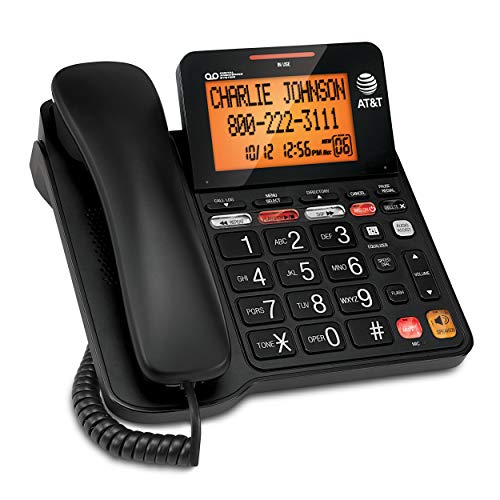
Home phone: AT&T CD4930 (corded)
Out of the box
The Amazon listing describes big buttons and an extra-large tilt backlit display. It stays on the table, so it is never lost in a bag.
For: calls at home by someone who no longer wants to find a small phone.
Not for: calls away from home. It needs a home phone line.
Read more: landline phones for elderly
shopping_cartCheck price on AmazonLow-vision helpers, including a large print keyboard
Small add-ons that make the phone and the desk easier. None of them is required.
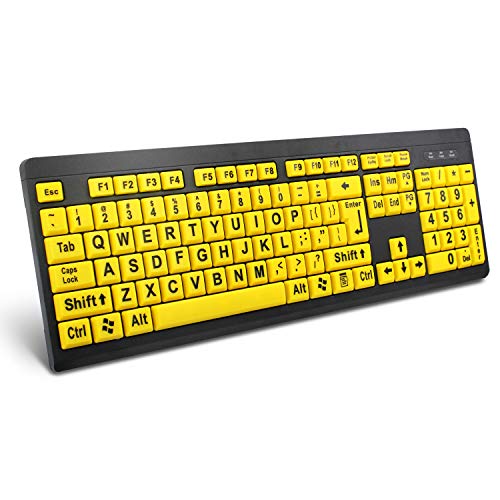
BOOGIIO large print keyboard
Wired USB keyboard with oversized black letters on yellow keys. For a computer, not the phone itself.
shopping_cartCheck price on Amazon
Large-letter keyboard stickers (yellow on black)
Stick-on labels that turn the keyboard you already own into a large-print one. The cheaper route.
shopping_cartCheck price on Amazon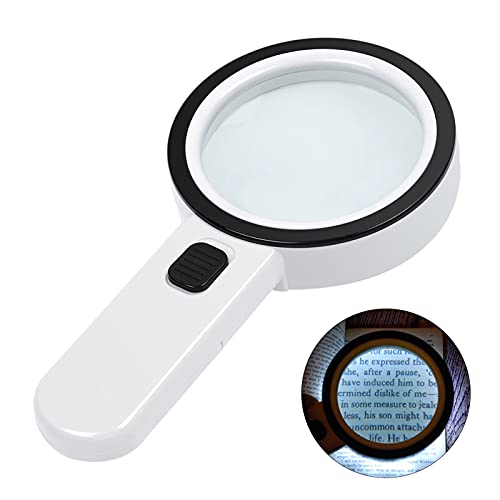
Lighted handheld magnifier
Battery LED magnifier for mail, pill bottles and menus. Useful when the phone is not in hand.
shopping_cartCheck price on Amazon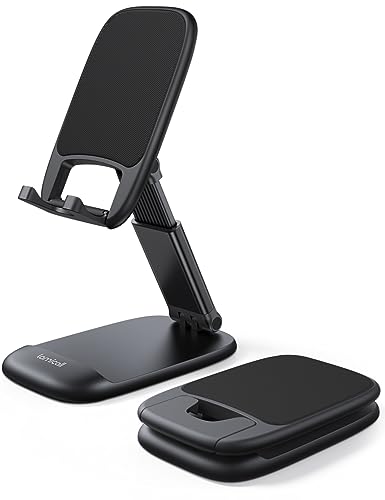
Adjustable phone stand
Holds the phone at eye level, so the reader can lean in and use both hands.
shopping_cartCheck price on Amazon
Phone lanyard
A neck strap means a dropped or misplaced phone is found by touch.
shopping_cartCheck price on Amazon
Matte anti-glare screen protector (fits 6.1-inch iPhones)
Cuts reflections from windows and lamps. The listing says this one fits 6.1-inch models: iPhone 13, 14, 16e and 17e. The iPhone 14 Plus above has a 6.7-inch screen and needs the larger size.
shopping_cartCheck price on AmazonFree and low-cost help
Each program sets its own rules. We describe them as their own pages do, as of November 2026. We cannot say who qualifies.
Apple and Google accessibility support
Apple says it offers accessibility support by phone, chat, in person or online, starting from its accessibility support page.
Google’s Disability Support team lists phone, chat, Be My Eyes and email help, weekdays. When we checked on November 5, 2026, only email showed as available.
State assistive technology programs
States run assistive technology (AT Act) programs. The AT3 Center directory lists what each one offers, such as device loans, device demos, device reuse and financial loans. A loan lets you try a device before buying.
iCanConnect (National Deaf-Blind Equipment Distribution Program)
iCanConnect says it provides free equipment and training for people with both significant hearing and vision loss. Its eligibility page says: “To be eligible for iCanConnect, you must meet the program’s disability and income eligibility guidelines.”
It also asks a professional to confirm the hearing and vision loss. You may qualify if your household is within 400% of the Federal Poverty Guidelines. Your local iCanConnect program handles applications and eligibility questions. The program says it is run locally in all 50 states. All as of November 2026.
Lifeline, for low-income households
USAC runs Lifeline for the FCC. It says: “If you qualify, you can get a monthly discount of up to $9.25 on phone, internet, or bundled service.” The FCC’s Lifeline page says phone-only service can get up to $5.25.
You may qualify if your household income is at 135% or less of the 2026 Federal Poverty Guidelines, or through programs such as SNAP or Medicaid (USAC’s qualify page). USAC’s National Verifier checks each application and decides who qualifies. One benefit per household. All as of November 2026. See our free cell phones for elderly guide.
Who each option suits
- iPhone: blind users and anyone in an iPhone family. Not for someone who will not practice gestures.
- Large-screen Android: low vision on a budget. Not for someone who needs menus that never move.
- Jitterbug Smart5: low vision and new to smartphones. Not for full screen-reader users.
- Jitterbug Flip3: calls by touch and voice dial. Not for reading messages.
- Big-button basic phone: large keys, no plan lock-in. Not for anyone who needs speech output.
- Corded home phone: home calls with nothing to lose. Not for calls on the go.
Frequently Asked Questions
Is there a phone that reads everything aloud?
Yes. An iPhone with VoiceOver or an Android phone with TalkBack can speak what is on the screen as you touch it. Both are free and come with the phone.
They take practice, because taps work differently once the screen reader is on. Lively's Smart5 and Flip3 describe a simpler read-out feature, not a full screen reader.
Can a flip phone talk?
Some can. Lively lists Read Out and voice dial on the Jitterbug Flip3: you say "Dial" and a contact name. That is as of November 2026.
We could not confirm talking caller ID on Lively's page, so do not count on it. Check the maker's page for any flip phone before you buy.
What text size can an iPhone reach?
Apple does not publish a point size. Under Settings, then Accessibility, then Display & Text Size, Larger Text adds extra sizes beyond the normal slider.
Apple warns that very large text can make buttons harder to tap. For bigger still, Zoom enlarges anything on the screen and Magnifier uses the camera to enlarge things around you.
Is a tablet easier than a phone for low vision?
It can be, at home. A bigger screen shows bigger text with less scrolling, and the same built-in tools work on an iPad or an Android tablet.
It is no help away from home, so most people keep a phone too. See the tablets on our best tech for seniors page.
Do I need to pay for any of these accessibility features?
No. VoiceOver, Zoom, Magnifier, TalkBack and Android Magnification come with the phone at no cost. What costs money is the phone and the plan, plus any add-on service.
Lively phones, for example, need a paid Lively plan to work at all.
Is there free help for blind or deaf-blind seniors?
There is some. iCanConnect says it provides free equipment and training to people with both significant hearing and vision loss who meet the program's disability and income guidelines (as of November 2026). Your local iCanConnect program handles eligibility.
State assistive technology programs list device loans and demos. Apple and Google run accessibility support teams. The iCanConnect and AT3 Center websites list each state's contacts.
Tablets are covered on our best tech for seniors page.
Sources
Program and price facts come from each provider’s own page, checked November 6, 2026.
You now know the tools are free and built in, and that the phone choice comes down to screen size and touch. Next question: which phone is simplest to live with day to day? Our easiest cell phone for seniors guide answers that.