Tablet Buying Guide
The Best Tablets for Seniors in 2026
Affiliate disclosure: We may earn a commission if you buy through links on this page. It never changes our rankings. How we earn
For most Wi-Fi homes, start with the Amazon Fire HD 10. It pairs a big screen with Alexa voice help. iPhone families should get an iPad instead. If any tablet feels like too much, look at the GrandPad and its monthly plan.
We sort tablets by the person, not the spec sheet. Each pick says who it suits and who should skip it. We earn from qualifying purchases through some links here, at no extra cost to you.
Our Picks by Need
Start with the one that matches the person. No single tablet fits everyone, so each card says who should skip it.
 Value pick: lowest price with a 10-inch screen
Amazon Fire HD 10
We point most Wi-Fi homes to the Fire HD 10 first. Its 10.1-inch Full HD screen is big enough to read from a chair, and Alexa answers by voice. Amazon lists up to 13 hours of video playback.
Why we recommend it
- check_circleA 10.1-inch screen keeps text and photos large.
- check_circleAlexa helps by voice, from recipes to reading.
- check_circleA front camera handles video calls in apps like Zoom.
Good for: A Wi-Fi home that wants a big screen for reading, photos, and video calls without a big outlay.
Not for: Someone who needs Google Play apps. Amazon's listing says Google Play is not supported on Fire tablets.
 Smaller Fire tablet
Amazon Fire HD 8
The Fire HD 8 runs the same Fire software in a smaller size. The screen is 8 inches. Alexa voice help is built in here too.
Why we recommend it
- check_circleA smaller size fits a bedside table or a bag.
- check_circleSame Fire menus as the HD 10, so help carries over.
- check_circleAmazon lists up to 13 hours of mixed use.
Good for: A reader who wants a smaller tablet and already knows Fire or Kindle menus.
Not for: Weaker eyes. Text and photos are smaller on 8 inches than on the HD 10.
 Best for iPhone families
Apple iPad 11-inch (A16)
Pick the iPad when the family already uses iPhones. FaceTime works the same way it does on their phones. Apple's Assistive Access mode can also pare the iPad down to a few apps.
Why we recommend it
- check_circleFaceTime video calls are built in.
- check_circleMenus match the iPhones the helpers already know.
- check_circleAssistive Access offers a simpler mode a supporter sets up.
Good for: An iPhone family that will help with setup and wants FaceTime on a big 11-inch screen.
Not for: A tight budget, or a family with no Apple devices to help from.
 Simple layout, Google apps
Pix-Star Touch 10.1" Tablet
Pix-Star calls the Touch tablet's layout a "simple and easy-to-learn user interface" for beginners. A zoom feature can enlarge the whole screen layout. Later on, it can install apps from the Google Play Store.
Why we recommend it
- check_circleA beginner-focused layout on a 10.1-inch screen.
- check_circleZoom enlarges the whole interface, buttons included.
- check_circleGoogle Play apps are available when the person is ready.
Good for: A beginner on home Wi-Fi who may later want regular Android apps.
Not for: A family that wants to manage the tablet from afar. Pix-Star's tablet page does not describe remote management.
 For a true beginner
GrandPad
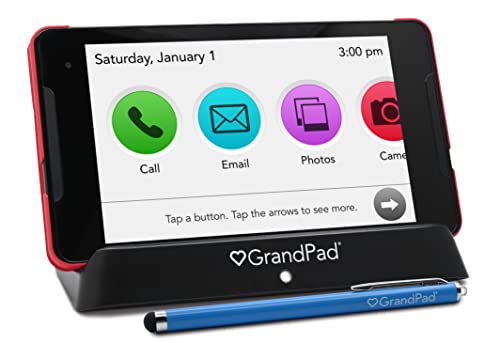
The GrandPad is a tablet sold with a monthly plan. Family manage it through a free Companion App. It runs only GrandPad's own preloaded apps.
Cost as of November 2026: $349 for the tablet on grandpad.net, plus taxes and fees. Plans run about $25 to $65 a month. Plan prices are shown on grandpad.net at checkout; confirm the current figure there (read 2026-11-05). GrandPad says no plan has a long-term commitment. The Amazon listing title says it is "Locked" and "Requires a Plan."
Good for: Someone new to any screen, with family willing to run it remotely.
Not for: Anyone comfortable with a normal tablet, or a household avoiding a monthly bill.
Read our GrandPad review for each plan, side by side.
shopping_cartCheck price on AmazonTwo Things to Know Before You Buy
Fire tablets show lockscreen ads
As of November 2026, Amazon's Fire HD 10 listing says the model "comes with lockscreen ads." The ads appear as sponsored screensavers on the lock screen.
Amazon's help page explains how to remove them. Go to Manage Your Devices, pick the tablet, and choose Remove offers. A pop-up shows the price. Amazon charges it once, to your 1-Click payment method.
iPad has a simpler mode: Assistive Access
Apple describes Assistive Access as an iPadOS mode that "makes it easier for people with cognitive disabilities" to use iPad. A supporter picks the apps, such as Calls, Messages, Music, and TV.
Apple suggests setting it up with "a trusted supporter," such as a family member or caregiver. It starts in Settings, then Accessibility. A separate passcode is needed to leave the mode. This is from Apple's support guide, as of November 2026.
How to Choose a Tablet for a Senior
Screen size
A 10-inch or 11-inch screen keeps text and photos large. That size reads well from a chair. An 8-inch tablet is easier to tuck away, with smaller text.
Simplicity
Fewer menus mean fewer wrong turns. Assistive Access trims an iPad down. The GrandPad goes furthest, with only its own apps.
Who will help
Match the tablet to the helpers. If they use iPhones, an iPad feels familiar to everyone, and talking someone through a menu over the phone is much easier when you both see the same screen.
Wi-Fi or cellular
Most seniors only need home Wi-Fi. The GrandPad's Premium plan and its top 10GB plan add mobile data, as of November 2026. Its Basic plan is Wi-Fi only.
Make Any Tablet Easier
Bigger text and a cleaner home screen help on any tablet, and both take only a few minutes in Settings. The steps differ by system, so we wrote one guide for each.
Frequently Asked Questions
What is the easiest tablet for a senior to use?
For a true beginner, the GrandPad is the most stripped-back option here. Family set it up, and it runs GrandPad's own simple apps. It needs a paid GrandPad plan.
If the person can manage a bit more, the Fire HD 10 is simple and costs less. iPhone families do best with an iPad, using Assistive Access if needed.
Is an iPad or Fire tablet better for seniors?
It depends on the family. An iPad is the better pick when helpers use iPhones, because FaceTime and the menus already feel familiar.
A Fire tablet usually costs less. It handles reading and photos well, and Zoom calls work too. It shows lockscreen ads unless you pay Amazon a one-time fee to remove them.
Do seniors need a data plan for a tablet?
Most do not. Home Wi-Fi covers video calls, photos, and browsing with no extra monthly bill.
Cellular data matters only if the tablet leaves home or the house has no internet. The GrandPad sells plans with and without mobile data, as of November 2026.
What screen size should seniors get?
A 10-inch or 11-inch screen suits most seniors. Text and photos stay large from a chair.
An 8-inch tablet is smaller to carry and store. The trade is smaller text and photos.
Where these facts come from
We checked each maker's own page in November 2026. We have not tested these tablets by hand. Sources: Apple Assistive Access guide, GrandPad shop page, Pix-Star Touch page, and the Amazon product listings and help pages.
Once the tablet is settled, the next question is usually the phone. Our easiest cell phones for seniors guide answers it. For gear beyond tablets, see best tech for seniors.